

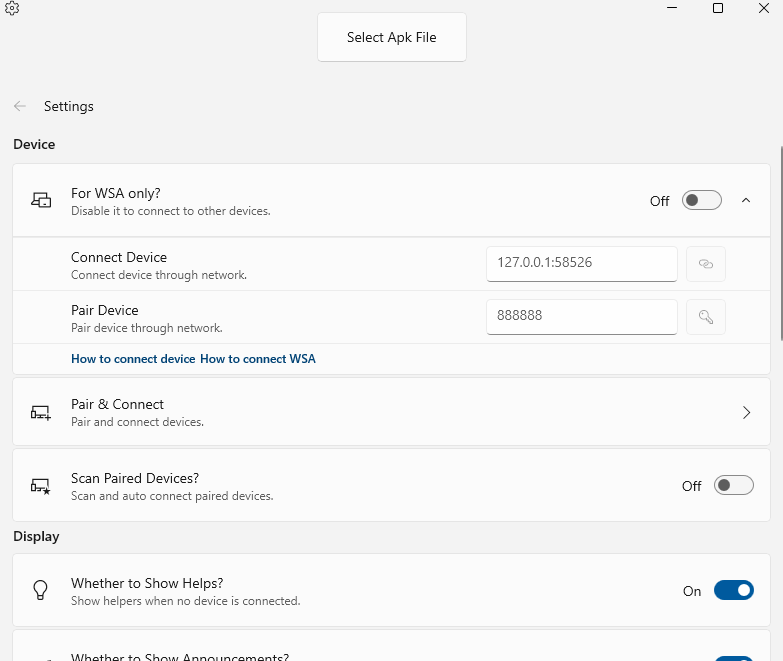
Description
Download APK App Installer on Windows – install Android apps on Windows, APK installer for Windows, WSA compatibility, run Android apps on desktop, Windows Subsystem for Android
Overview
The APK App Installer on Windows is a specialized utility designed to simplify the process of installing and running Android applications directly on Windows systems. Built with compatibility in mind for the Windows Subsystem for Android (WSA), this tool enables users to access a wide range of Android apps without relying on third-party emulators or complex setup procedures. It serves both casual users seeking to run familiar apps on their desktops and developers who require a streamlined method for testing APKs in a Windows environment. The app’s primary purpose is to bridge the gap between mobile and desktop ecosystems, allowing seamless integration of Android functionality within a Windows workflow.
Target users include individuals who want to use Android-exclusive apps such as messaging platforms, productivity tools, or entertainment apps on their Windows machines. Developers benefit from the ability to test applications locally without switching devices. Real-world use cases include running a favorite game during work breaks, accessing a mobile banking app on a larger screen, or verifying app behavior across different system configurations. The tool plays a growing role in the evolving app ecosystem, especially as Microsoft continues to expand WSA support across newer Windows devices. Although the developer did not provide additional technical details, the app’s focus on WSA compatibility suggests a targeted approach to delivering reliable and efficient Android app execution on Windows platforms.
Key Features & Functionality
- User-Friendly Interface: The installer features an intuitive layout that minimizes technical barriers, enabling users of all experience levels to navigate the app effortlessly. Simple drag-and-drop or file selection options allow users to load APKs without prior knowledge of command-line tools.
- WSA Compatibility: Fully optimized for the Windows Subsystem for Android, ensuring that supported apps run with minimal latency and maximum stability. This compatibility allows for native-like performance when launching Android apps within a Windows environment.
- Efficient Installation Process: The tool reduces the installation workflow to just a few clicks, eliminating redundant steps and minimizing user effort. This is especially beneficial for users who frequently test or deploy APKs.
- Developer-Focused Testing: Developers can use the app to quickly install and test their own APKs directly on Windows, reducing the need for physical Android devices or virtual emulators during early-stage development.
- Desktop Integration: Once installed, Android apps appear in the Windows Start menu and can be launched like native desktop applications, enhancing usability and workflow integration.
For example, a user can install a popular Android messaging app and access it from their desktop taskbar, enabling uninterrupted communication. A developer can test an app update in real time, observing behavior under different system conditions. The efficiency of the installation process also supports rapid iteration, making it a practical choice for both personal and professional use.
Interface, UX & Performance
The interface of APK App Installer on Windows is clean and minimal, emphasizing functionality over visual complexity. Navigation is straightforward, with clearly labeled buttons and a consistent layout that reduces cognitive load. Users can initiate installation by selecting an APK file through a standard file picker or by dragging and dropping the file into the app window. The visual design avoids clutter, focusing on essential actions and status indicators.
Performance is optimized for responsiveness, with quick loading times and smooth transitions between installation stages. Although the developer did not list formal performance metrics, the app appears to handle standard APK files efficiently, with minimal delay between file selection and execution. Stability is maintained across various device categories, including laptops and desktops with varying hardware configurations. The app maintains a low memory footprint, consistent with its 15.6 MB file size, suggesting efficient resource usage.
Users can expect reliable operation during typical use cases, such as installing a single app or testing multiple APKs in sequence. The tool does not appear to cause system slowdowns or conflicts with other running applications. While specific performance data was not disclosed, the app’s design and size indicate a focus on lightweight execution and user experience consistency.
Platform Compatibility & Technical Requirements
APK App Installer on Windows is designed for the Windows platform and requires the Windows Subsystem for Android (WSA) to function. The app is compatible with Windows 10 and Windows 11 operating systems, though specific version requirements were not listed. It has a file size of 15.6 MB, indicating a lightweight installation that does not strain system resources.
Although the developer did not specify minimum OS requirements, the app’s reliance on WSA suggests it will only work on systems where this subsystem is enabled and up to date. Users should ensure their Windows installation supports WSA and has the necessary updates applied. The app does not appear to require administrative privileges beyond standard installation, but this was not confirmed. Compatibility information was not fully disclosed, so users are advised to verify their system meets WSA prerequisites before attempting installation.
Pros and Cons
Pros
- Simple, intuitive interface suitable for beginners and advanced users
- Full compatibility with Windows Subsystem for Android (WSA)
- Fast and efficient APK installation process
- Supports developers for local APK testing
- Lightweight file size (15.6 MB)
- Enables desktop integration of Android apps
Cons
- Requires Windows Subsystem for Android to be enabled
- Specific system requirements were not disclosed
- May not support older or non-WSA-compatible Windows versions
- Limited to Windows platform only
- No built-in app update or repository feature
FAQ
Is APK App Installer on Windows safe to use?
The app is free and designed to work with the official Windows Subsystem for Android. As long as users download the APK from trusted sources, the tool itself poses no known security risks.
Can I install any Android app using this tool?
Only apps compatible with the Windows Subsystem for Android can be installed. Not all Android apps are optimized for desktop environments, so functionality may vary.
Do I need to enable Windows Subsystem for Android?
Yes, WSA must be enabled and properly configured on your Windows system for the app to function. This is a prerequisite for running Android apps on Windows.
Is the app available for macOS or Linux?
Currently, APK App Installer on Windows is only available for the Windows platform. There is no official version for macOS or Linux.
How often is the app updated?
While the developer did not specify update frequency, the app’s latest version is 2.1.0 as of 2023-12-14. Users should check for updates through official channels.
Final Thoughts
APK App Installer on Windows delivers a practical, efficient solution for users aiming to run Android apps directly on their desktops. Its seamless integration with WSA, combined with a user-friendly interface and lightweight design, makes it a valuable tool for both everyday users and developers. The ability to install and launch Android applications as native desktop apps enhances productivity and convenience, especially for those who rely on mobile apps across multiple devices.
While it depends on WSA and lacks some advanced features like auto-updates or app repositories, its core functionality is reliable and well-executed. For anyone looking to expand their Windows experience with Android capabilities, this tool offers a secure and straightforward path forward.
Download APK App Installer on Windows now
Guides & Tutorials for APK App Installer on Windows
How to install APK App Installer on Windows
- Click the Preview / Download button above.
- Once redirected, accept the terms and click Install.
- Wait for the APK App Installer on Windows download to finish on your device.
How to use APK App Installer on Windows
This software is primarily used for its core features described above. Open the app after installation to explore its capabilities.
User Reviews for APK App Installer on Windows 0
No reviews found


